Asset Manager. Know what you own.
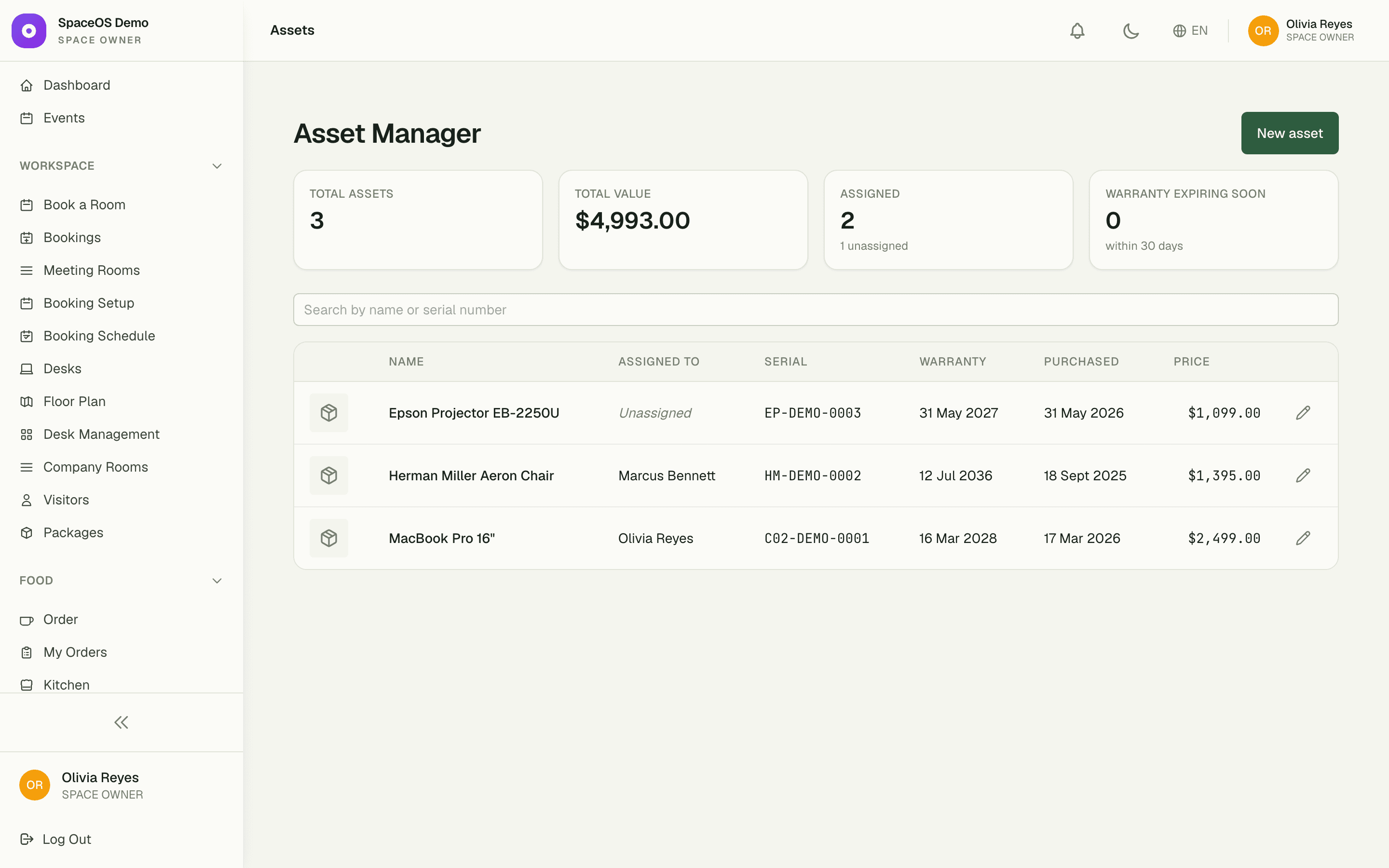
Register every laptop, chair, projector, and access card the company owns — with photos, receipts, and a named holder. When something walks out the door, you know exactly whose hands it was in.
1
register for everything you own
100%
of hand-offs recorded — who, when, why
0
warranties expiring unnoticed
Capabilities
Everything the module does
Asset Manager gives your space a lightweight register for the physical things it owns — laptops, furniture, tools, equipment. Record each asset with photos, purchase and receipt details, and serial or warranty info, then assign it to a space user and track the hand-over history as it moves between people. Designed for at-a-glance ownership rather than heavyweight depreciation accounting.
Asset register
Catalog every company asset with photos, a category, and its current status.
Purchase & receipt
Store purchase date, cost, supplier, and an attached receipt image per asset.
Serial & warranty
Track serial numbers and warranty expiry so nothing slips past its cover.
Assignee & history
Assign an asset to a space user and keep a full rotation history as it changes hands.
01
Every asset, fully documented
Each entry carries a photo, the purchase receipt, cost, supplier, serial number, and warranty date — like the demo's MacBook Pro 16" at $2,499, covered through March 2028. Search and filter across the register instead of digging through a drawer of invoices.
- Photo and receipt uploads on every asset
- Serial numbers and warranty expiry tracked
- Search and filter by category, status, or holder
02
Hand-offs with a paper trail
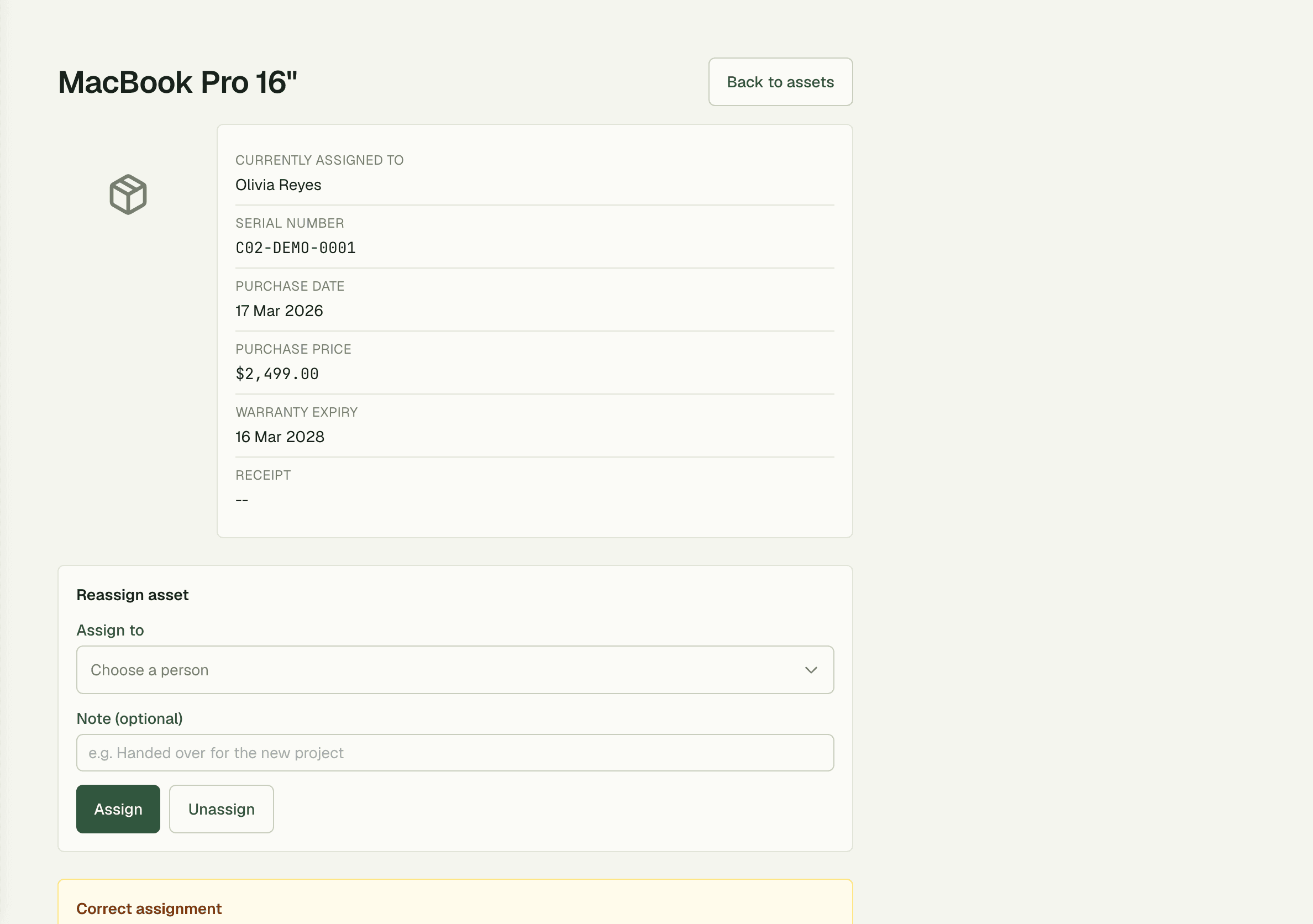
Assign an asset to a person and the register records who holds it, when it changed hands, who authorized the move, and why. When the MacBook assigned to Olivia Reyes comes back or moves on, the full rotation history is one click away — no whose-laptop-is-this archaeology.

03
The right access for each role
Owners get full control including the power to correct mistakes in the record; Managers can view, create, and edit; Finance and HR get full access including assignments. Everyone who needs the register can use it — and nobody can quietly rewrite history.
- Owner: full access plus record corrections
- Manager: view, create, and edit assets
- Finance & HR: full access including assignments
“We onboard and offboard members' teams every month, and gear used to vanish in the shuffle. Now every laptop and access card has a name on it, and offboarding is a checklist instead of a search party.”
Priya Nair
Facilities Manager, Urban Workspace
FAQ
Common questions
Is this a full fixed-asset accounting system?
No — it's deliberately lightweight. Asset Manager is built for at-a-glance ownership: what you own, what it cost, and who has it. Depreciation schedules belong in your accounting software.
What happens when an asset changes hands?
You reassign it to the new holder, and the register keeps the full history — who held it, when it moved, who made the change, and why. Nothing is overwritten.
Who can edit the register?
Access is role-based: Owners have full control including corrections to past records, Managers can view, create, and edit, and Finance and HR have full access including assignments.
Works better together
One need, one module
Every module shares the same customers, catalog, and books — switch one on and it plugs into everything you already run.
Switch on Asset Manager today.
It plugs straight into the customers, catalog, and billing you already run on SpaceOS.
Free to start · No credit card required · Cancel anytime